 刘静林
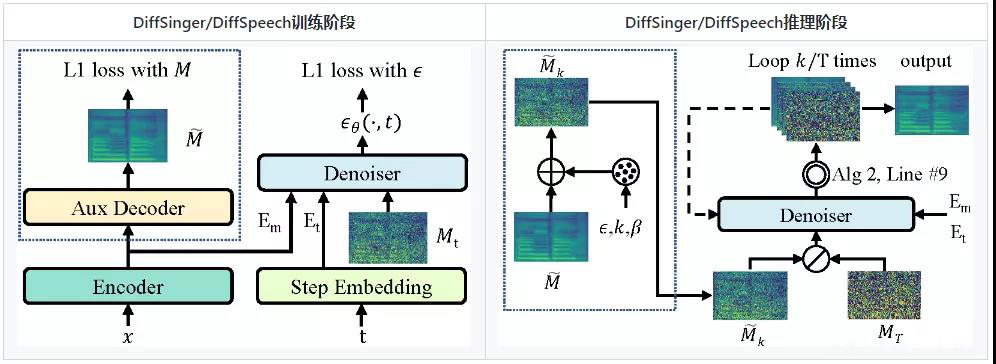
刘静林本文将分享浙江大学计算机学院赵洲老师团队在AAAI-2022 论文中提出的DiffSpeech (用于语音合成)与DiffSinger (用于歌声合成)的官方Pytorch实现。
开源地址
https://github.com/MoonInTheRiver/DiffSinger
论文地址
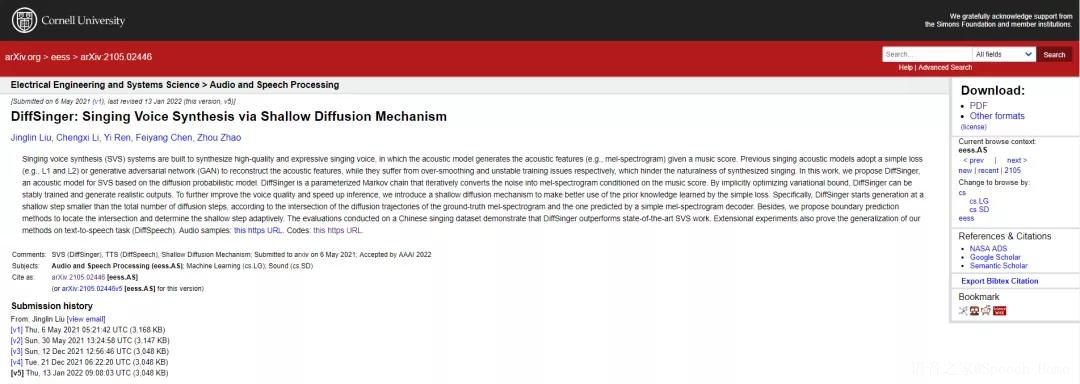
DiffSinger: Singing Voice Synthesis via Shallow Diffusion Mechanism
https://arxiv.org/abs/2105.02446

1.准备工作
数据准备
a) 下载并解压 LJ Speech dataset, 创建软链接: ln -s /xxx/LJSpeech-1.1/ data/raw/
b) 下载并解压 我们用MFA预处理好的对齐: tar -xvf mfa_outputs.tar; mv mfa_outputs data/processed/ljspeech/
c) 按照如下脚本给数据集打包,打包后的二进制文件用于后续的训练和推理.
export PYTHONPATH=.
CUDA_VISIBLE_DEVICES=0 python data_gen/tts/bin/binarize.py --config configs/tts/lj/fs2.yaml

# `data/binary/ljspeech` will be generated.
声码器准备
CUDA_VISIBLE_DEVICES=0 python tasks/run.py --config configs/tts/lj/fs2.yaml --exp_name fs2_lj_1 --reset然后为了训练DiffSpeech, 运行:
CUDA_VISIBLE_DEVICES=0 python tasks/run.py --config usr/configs/lj_ds_beta6.yaml --exp_name lj_exp1 --reset记得针对你的路径修改usr/configs/lj_ds_beta6.yaml里"fs2_ckpt"这个参数。
CUDA_VISIBLE_DEVICES=0 python tasks/run.py --config usr/configs/lj_ds_beta6.yaml --exp_name lj_exp1 --reset --inferDiffSpeech的预训练模型; FastSpeech 2的预训练模型, 这是为了DiffSpeech里的浅扩散机制;
申请表: https://github.com/MoonInTheRiver/DiffSinger/blob/master/resources/apply_form.md 数据集预览: https://github.com/MoonInTheRiver/DiffSinger/releases/download/pretrain-model/popcs_preview.zip
export PYTHONPATH=.
CUDA_VISIBLE_DEVICES=0 python data_gen/tts/bin/binarize.py --config usr/configs/popcs_ds_beta6.yaml
# `data/binary/popcs-pmf0` 会生成出来.
声码器准备
# First, train fft-singer;
CUDA_VISIBLE_DEVICES=0 python tasks/run.py --config usr/configs/popcs_fs2.yaml --exp_name popcs_fs2_pmf0_1230 --reset
# Then, infer fft-singer;
CUDA_VISIBLE_DEVICES=0 python tasks/run.py --config usr/configs/popcs_fs2.yaml --exp_name popcs_fs2_pmf0_1230 --reset --infer
然后, 为了训练DiffSinger, 运行:
CUDA_VISIBLE_DEVICES=0 python tasks/run.py --config usr/configs/popcs_ds_beta6_offline.yaml --exp_name popcs_exp2 --reset记得针对你的路径修改
usr/configs/popcs_ds_beta6_offline.yaml里"fs2_ckpt"这个参数。
3.推理样例
CUDA_VISIBLE_DEVICES=0 python tasks/run.py --config usr/configs/popcs_ds_beta6_offline.yaml --exp_name popcs_exp2 --reset --inferDiffSinger的预训练模型; FFT-Singer的预训练模型, 这是为了DiffSinger里的浅扩散机制;
记得把预训练模型放在 checkpoints 目录.


DiffSpeech vs. FastSpeech 2


音频样本可以看我们的样例页(https://diffsinger.github.io/)
我们也放了部分由DiffSpeech+HifiGAN (标记为[P]) 和 GTmel+HifiGAN (标记为[G]) 生成的测试集音频样例在:resources/demos_1213.
(对应这个预训练参数:
https://github.com/MoonInTheRiver/DiffSinger/releases/download/pretrain-model/lj_ds_beta6_1213.zip)
更新:新生成的歌声样例在:
resources/demos_0112.
如果本仓库对你的研究和工作有用,请引用以下论文:
@article{liu2021diffsinger,
title={Diffsinger: Singing voice synthesis via shallow diffusion mechanism},
author={Liu, Jinglin and Li, Chengxi and Ren, Yi and Chen, Feiyang and Liu, Peng and Zhao, Zhou},
journal={arXiv preprint arXiv:2105.02446},
volume={2},
year={2021}}