 语音小管家
语音小管家
近日,阿里发布了Qwen2-Audio模型。Qwen2-Audio 是一个大型的音频语言模型系列,它能够接受音频信号输入,进行音频分析或直接文本响应,支持语音聊天和音频分析两种交互模式,并且提供了预训练模型Qwen2-Audio-7B和聊天模型Qwen2-Audio-7B-Instruct的版本。
语音聊天:用户可以使用语音向音频语言模型发出指令,无需通过自动语音识别(ASR)模块。 音频分析:该模型能够根据文本指令分析音频信息,包括语音、声音、音乐等。 多语言支持:该模型支持超过8种语言和方言,例如中文、英语、粤语、法语、意大利语、西班牙语、德语和日语。
模型效果
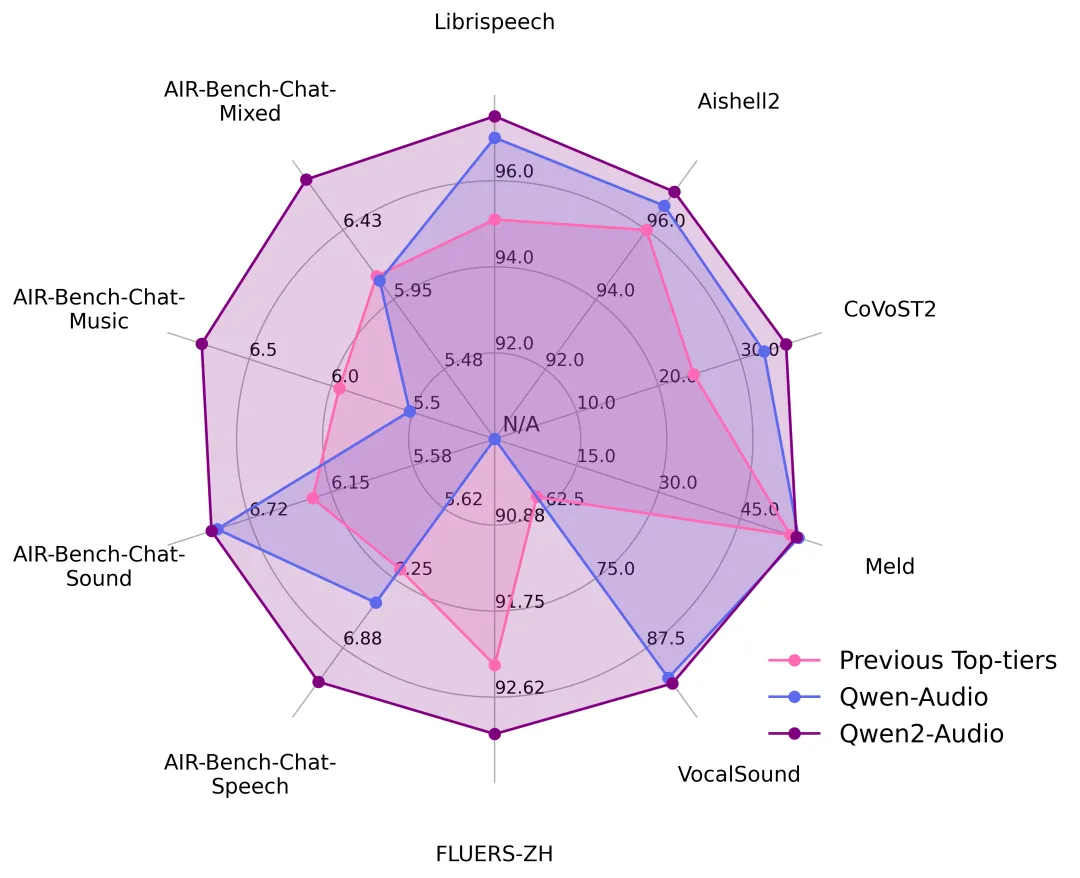
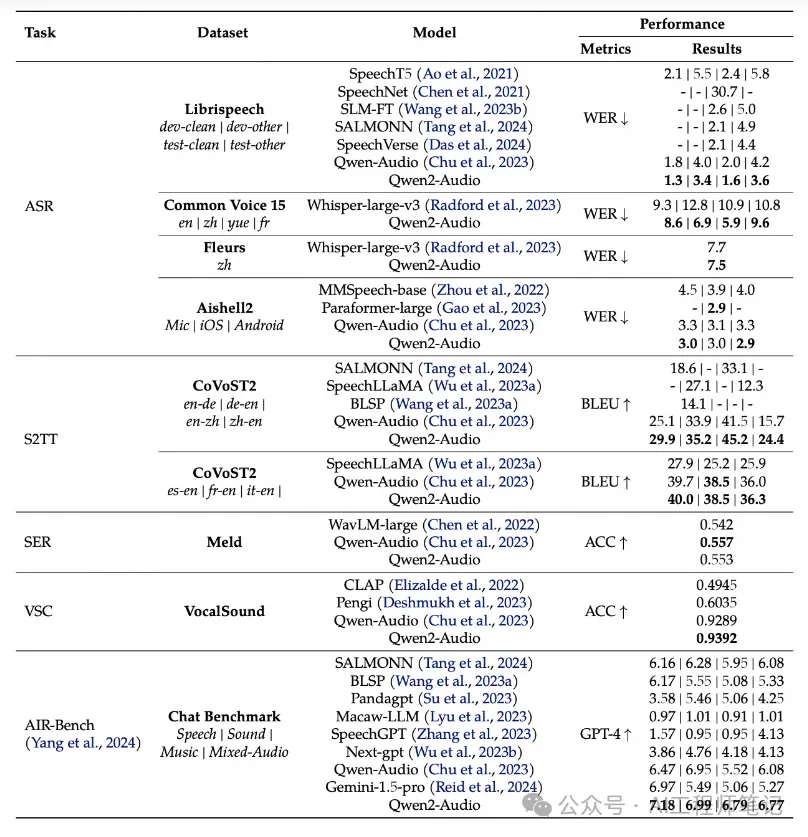
官方在一系列基准数据集上进行了实验,包括 LibriSpeech、Common Voice 15、Fleurs、Aishell2、CoVoST2、Meld、Vocalsound 以及 AIR-Benchmark,下面我们将展示一张图表来说明 Qwen2-Audio 相对于竞争对手的表现。在所有任务中,Qwen2-Audio 都显著超越了先前的最佳模型或是 Qwen-Audio。
关于数据集的更具体结果列于下表中。
结构与训练范式
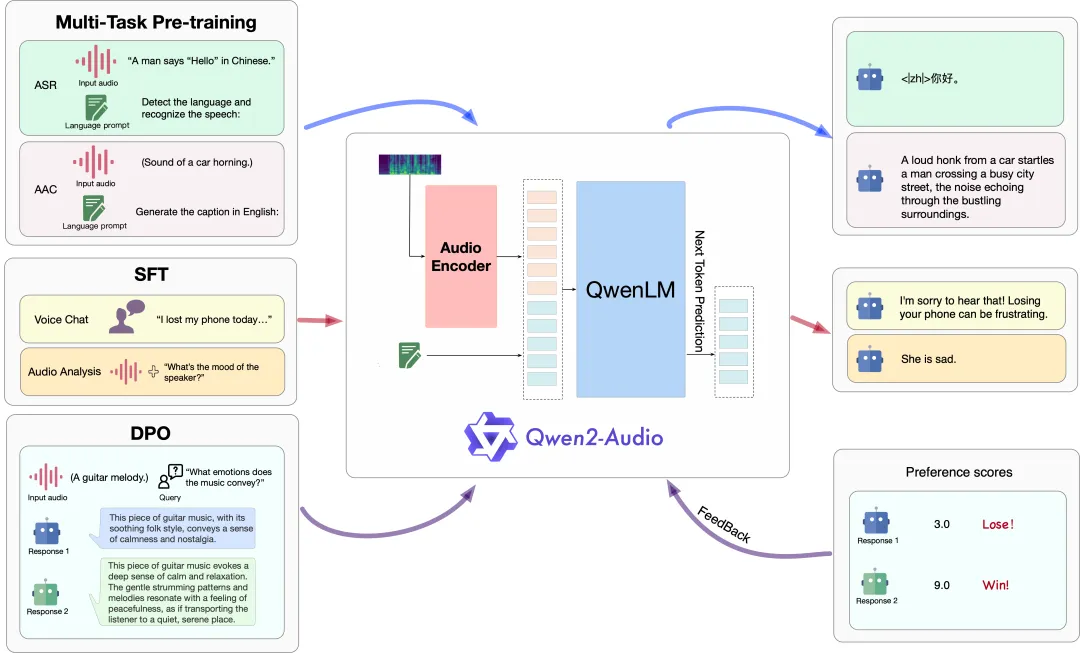
下图展示了模型结构及训练方法。具体来说,通义千问团队使用 Qwen 语言模型和音频编码器这两个基础模型,接着依次进行多任务预训练以实现音频与语言的对齐,以及 SFT 和 DPO 来掌握下游任务的能力并捕捉人类的偏好。
使 用
Qwen2-Audio 的代码已在最新的 Hugging face transformers 中,环境安装
pip install git+https://github.com/huggingface/transformers 语音聊天推理:
from io import BytesIO
from urllib.request import urlopen
import librosa
from transformers import Qwen2AudioForConditionalGeneration, AutoProcessor
from modelscope import snapshot_download
import torch

model_dir = snapshot_download("Qwen/Qwen2-Audio-7B-Instruct")

processor = AutoProcessor.from_pretrained(model_dir)
model = Qwen2AudioForConditionalGeneration.from_pretrained(model_dir, device_map="auto",torch_dtype=torch.bfloat16)

conversation = [
    {"role": "user", "content": [
        {"type": "audio", "audio_url": "https://qianwen-res.oss-cn-beijing.aliyuncs.com/Qwen2-Audio/audio/guess_age_gender.wav"},
    ]},
    {"role": "assistant", "content": "Yes, the speaker is female and in her twenties."},
    {"role": "user", "content": [
        {"type": "audio", "audio_url": "https://qianwen-res.oss-cn-beijing.aliyuncs.com/Qwen2-Audio/audio/translate_to_chinese.wav"},
    ]},
]
text = processor.apply_chat_template(conversation, add_generation_prompt=True, tokenize=False)
audios = []
for message in conversation:
    if isinstance(message["content"], list):
        for ele in message["content"]:
            if ele["type"] == "audio":
                audios.append(librosa.load(
                    BytesIO(urlopen(ele['audio_url']).read()),
                    sr=processor.feature_extractor.sampling_rate)[0]
                )

inputs = processor(text=text, audios=audios, return_tensors="pt", padding=True)
inputs = inputs.to("cuda")

generate_ids = model.generate(**inputs, max_length=256)
generate_ids = generate_ids[:, inputs.input_ids.size(1):]

response = processor.batch_decode(generate_ids, skip_special_tokens=True, clean_up_tokenization_spaces=False)[0]
音频分析推理:
from io import BytesIO
from urllib.request import urlopen
import librosa
from transformers import Qwen2AudioForConditionalGeneration, AutoProcessor
from modelscope import snapshot_download
import torch

model_dir = snapshot_download("Qwen/Qwen2-Audio-7B-Instruct")

processor = AutoProcessor.from_pretrained(model_dir)
model = Qwen2AudioForConditionalGeneration.from_pretrained(model_dir, device_map="auto",torch_dtype=torch.bfloat16)

conversation = [
    {'role': 'system', 'content': 'You are a helpful assistant.'},
    {"role": "user", "content": [
        {"type": "audio", "audio_url": "https://qianwen-res.oss-cn-beijing.aliyuncs.com/Qwen2-Audio/audio/glass-breaking-151256.mp3"},
        {"type": "text", "text": "What's that sound?"},
    ]},
    {"role": "assistant", "content": "It is the sound of glass shattering."},
    {"role": "user", "content": [
        {"type": "text", "text": "What can you do when you hear that?"},
    ]},
    {"role": "assistant", "content": "Stay alert and cautious, and check if anyone is hurt or if there is any damage to property."},
    {"role": "user", "content": [
        {"type": "audio", "audio_url": "https://qianwen-res.oss-cn-beijing.aliyuncs.com/Qwen2-Audio/audio/1272-128104-0000.flac"},
        {"type": "text", "text": "What does the person say?"},
    ]},
]
text = processor.apply_chat_template(conversation, add_generation_prompt=True, tokenize=False)
audios = []
for message in conversation:
    if isinstance(message["content"], list):
        for ele in message["content"]:
            if ele["type"] == "audio":
                audios.append(
                    librosa.load(
                        BytesIO(urlopen(ele['audio_url']).read()),
                        sr=processor.feature_extractor.sampling_rate)[0]
                )

inputs = processor(text=text, audios=audios, return_tensors="pt", padding=True)
inputs = inputs.to("cuda")

generate_ids = model.generate(**inputs, max_length=256)
generate_ids = generate_ids[:, inputs.input_ids.size(1):]

response = processor.batch_decode(generate_ids, skip_special_tokens=True, clean_up_tokenization_spaces=False)[0]
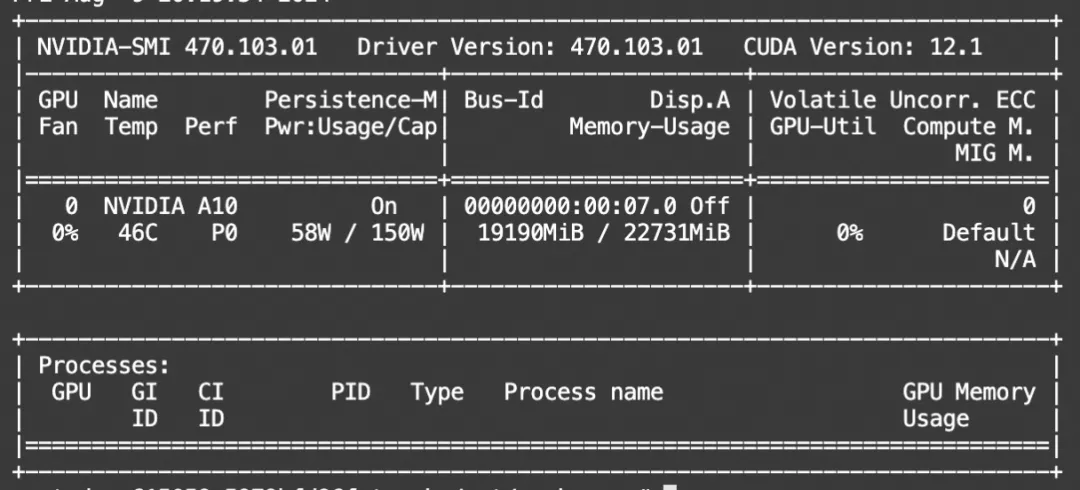
显存占用:
vllm推理
# 从源码安装vllm(大约安装20分钟)
pip install git+https://github.com/faychu/vllm.git@qwen2-audio
# 安装transformers
pip install git+https://github.com/huggingface/transformers
import argparseimport requests
from transformers import AutoTokenizer, AutoProcessor
from transformers.pipelines.audio_utils import ffmpeg_read
from vllm import LLM, SamplingParams
from modelscope import snapshot_download
model_dir = snapshot_download('qwen/Qwen2-Audio-7B-Instruct')
parser = argparse.ArgumentParser()
parser.add_argument('path', type=str, nargs='?',
default=model_dir)
args = parser.parse_args()
path = args.path
if not path.endswith('/'):
path += '/'
def qwen2_audio_batch():
processor = AutoProcessor.from_pretrained(args.path)
conversation1 = [
{"role": "user", "content": [
{"type": "audio", "audio_url": "https://qianwen-res.oss-cn-beijing.aliyuncs.com/Qwen2-Audio/audio/glass-breaking-151256.mp3"},
{"type": "text", "text": "What's that sound?"},
]},
{"role": "assistant", "content": "It is the sound of glass shattering."},
{"role": "user", "content": [
{"type": "audio", "audio_url": "https://qianwen-res.oss-cn-beijing.aliyuncs.com/Qwen2-Audio/audio/f2641_0_throatclearing.wav"},
{"type": "text", "text": "What can you hear?"},
]}
]
conversation2 = [
{"role": "user", "content": [
{"type": "audio", "audio_url": "https://qianwen-res.oss-cn-beijing.aliyuncs.com/Qwen2-Audio/audio/1272-128104-0000.flac"},
{"type": "text", "text": "What does the person say?"},
]},
]
conversations = [conversation1, conversation2]
text = [processor.apply_chat_template(conversation, add_generation_prompt=True, tokenize=False, add_audio_id = True) for conversation in conversations]
audios = []
for conversation in conversations:
audio_infos_vllm = []
for message in conversation:
if isinstance(message["content"], list):
for ele in message["content"]:
if ele["type"] == "audio":
audio_infos_vllm.append(ffmpeg_read(requests.get(ele['audio_url']).content, sampling_rate=processor.feature_extractor.sampling_rate))
audios.append(audio_infos_vllm)
inputs = [
{
'prompt': text[i],
'multi_modal_data': {
'audio': audios[i]
}
} for i in range(len(conversations))
]
return inputs
def main():
llm = LLM(
model=path, trust_remote_code=True, gpu_memory_utilization=0.98,
enforce_eager=True, # Disable CUDA graph, force call forward in every decode step.
)
sampling_params = SamplingParams(
temperature=0.7, top_p=0.01, top_k=1, repetition_penalty=1.1, max_tokens=256,
stop_token_ids=[],
)
inputs = qwen2_audio_batch()
print(inputs)
outputs = llm.generate(inputs, sampling_params=sampling_params)
for i, output in enumerate(outputs):
generated_text = output.outputs[0].text
print()
print('=' * 40)
print(f"Inputs[{i}]: {inputs[i]['prompt']!r}")
print(f"Generated text: {generated_text!r}")
if __name__ == '__main__':
main() 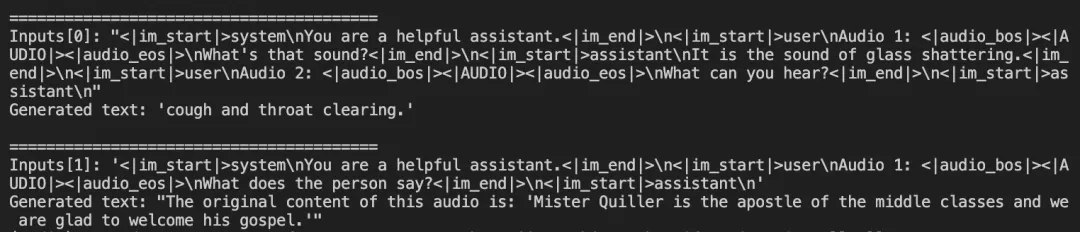
11尽管有了对Huggingface的访问限制,但是魔搭modelscope.cn在某种意义上,算是解决了大部分问题。
同时也可直接试用魔搭的在线Demo:https://modelscope.cn/studios/qwen/Qwen2-Audio-Instruct-Demo