 语音小管家
语音小管家EmotiVoice是一个强大的开源TTS引擎,支持中英文双语,包含2000多种不同的音色,以及特色的情感合成功能,支持合成包含快乐、兴奋、悲伤、愤怒等广泛情感的语音。
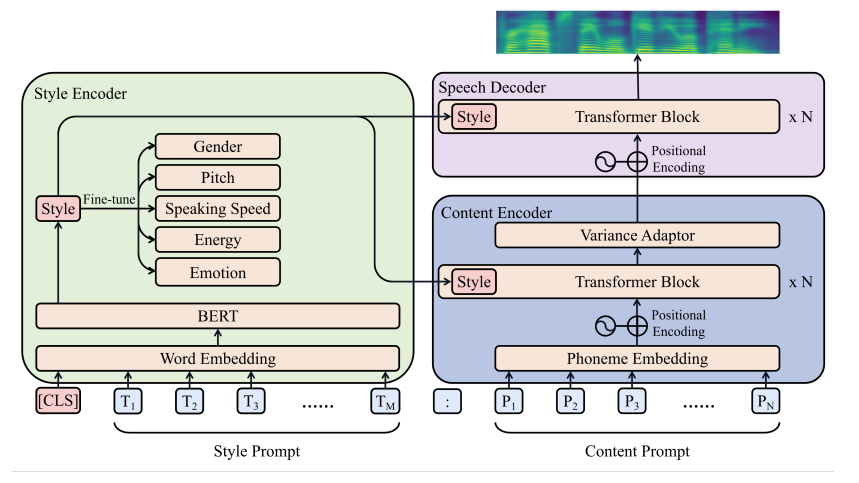
项目地址(基于PromptTTS):
https://github.com/netease-youdao/EmotiVoice
EmotiVoice Docker镜像
docker run -dp 127.0.0.1:8501:8501 syq163/emoti-voice:latest现在打开浏览器,导航到http://localhost:8501,就可以体验EmotiVoice强大的TTS功能。
完整安装
conda create -n EmotiVoice python=3.8 -y
conda activate EmotiVoice
pip install torch torchaudio
pip install numpy numba scipy transformers==4.26.1 soundfile yacs g2p_en jieba pypinyin
准备模型文件
git lfs install
git lfs clone https://huggingface.co/WangZeJun/simbert-base-chinese WangZeJun/simbert-base-chinese
推理
1. 下载预训练模型, 然后运行:
mkdir -p outputs/style_encoder/ckpt
mkdir -p outputs/prompt_tts_open_source_joint/ckpt3. 推理输入文本格式是:

TEXT=data/inference/text
python inference_am_vocoder_joint.py \
--logdir prompt_tts_open_source_joint \
--config_folder config/joint \
--checkpoint g_00140000 \
--test_file $TEXT pip install streamlit
streamlit run demo_page.py 许可
EmotiVoice是根据Apache-2.0许可证提供的 - 有关详细信息,请参阅许可证文