 语音小管家
语音小管家项目地址:
https://github.com/alibaba-damo-academy/FunCodec
https://modelscope.cn/models/damo/speech_synthesizer-laura-en-libritts-16k-codec_nq2-pytorch/summary
LauraTTS:
https://github.com/alibaba-damo-academy/FunCodec/tree/master/egs/LibriTTS/text2speech_laura
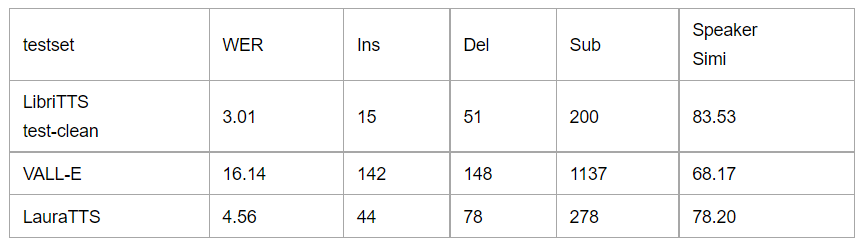
Test set: LibriTTS test-clean Metrics: WER and Ins, Del, Sub errors. Speaker similarity: Cosine similarity with Resemblyzer encoder
Highlights
较高的语音合成质量 具备 zero-shot 说话人自适应能力 可以用于多种场景,例如音色转换(Voice conversion)
项目介绍
Decoder-only Transformer可以看做一个conditional 语言模型,它以 prompt text, text 和 prompt audio 作为 conditions,对要合成的语音 token 进行建模。在本模型中,我们使用FunCodec通用语音量化器 Encoder-only Transformer 则以 Decoder-only Transformer 的输出作为输入,以 text 作为 condition,预测FunCodec通用语音量化器 更多细节详见: FunCodec: A Fundamental, Reproducible and Integrable Open-source Toolkit for Neural Speech Codec LauraGPT: Listen, Attend, Understand, and Regenerate Audio with GPT
如何使用模型
conda install pytorch==1.12.0 # 对于其他版本,请参考 https://pytorch.org/get-started/locally #
下载项目代码:
git clone https://github.com/alibaba-damo-academy/FunCodec.git # 安装 FunCodec:
cd FunCodec
pipinstall --editable ./
使用 FunCodec 进行语音合成
接下以 LibriTTS 数据集为例,介绍如何使用 FunCodec 进行语音合成:
# 进入工作目录
cd egs/LibriTTS/text2speech_laura
model_name="speech_synthesizer-laura-en-libritts-16k-codec_nq2-pytorch"
# 1. 生成音色随机的语音,生成结果保存在 results 文件夹下
bashdemo.sh --stage1--model_name${model_name}--output_dir results --text"hello world"# 2. 生成给定说话人的语音,生成结果保存在 results 文件夹下
bashdemo.sh --stage2--model_name${model_name}--output_dir results --text"hello world"\--prompt_text"one of these is context"--prompt_audio"demo/8230_279154_000013_000003.wav"使用 ModelScope 进行语音合成
from modelscope.pipelines import pipeline
from modelscope.utils.constant import Tasks
my_pipeline = pipeline(
   task=Tasks.text_to_speech,
   model='damo/speech_synthesizer-laura-en-libritts-16k-codec_nq2-pytorch'
)
text='nothing was to be done but to put about, and return in disappointment towards the north.'
prompt_text='one of these is context'
prompt_speech='https://isv-data.oss-cn-hangzhou.aliyuncs.com/ics/MaaS/ASR/test_data/FunCodec/prompt.wav'
# free generation
print(my_pipeline(text))
# zero-shot generation
print(my_pipeline(text, prompt_text, prompt_speech))